




From Vertical to Viral: Why 9:16 is the New 16:9
The seismic shift to 9:16 vertical video isn't just a trend—it's an SEO imperative for brands keen on dominating mobile feeds and capturing fleeting attention in today's cutthroat digital landscape.
 Story by:
Technology Blog
Story by:
Technology Blog
In the golden age of horizontal storytelling, wide screens ruled. We filmed in 16:9, edited for theaters or desktops, and called it a day. But that era? It’s officially flipped. The vertical revolution is here, and it fits in the palm of your hand.
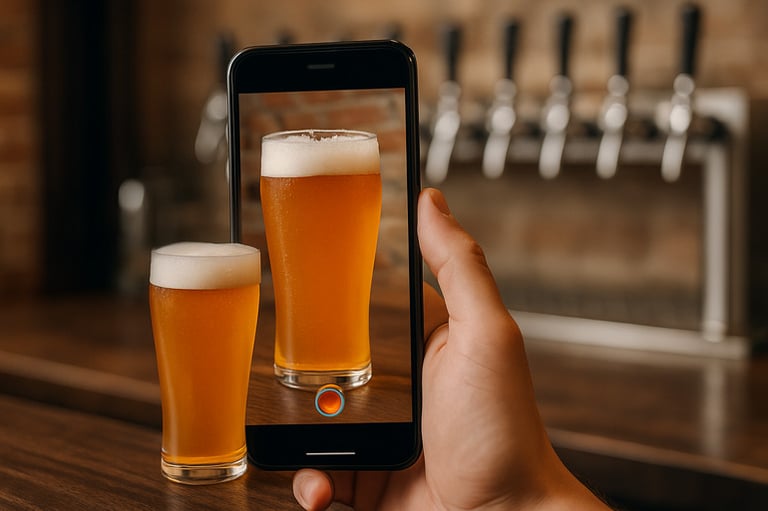
From TikTok to Instagram Reels to YouTube Shorts, vertical content has become the standard, not a compromise. What was once considered an unconventional format is now the most effective way to capture attention, especially among lifestyle-driven audiences. For breweries, beverage brands, and beer content creators, embracing vertical video is no longer optional. Presenting content in a vertical format ensures it fits naturally into how today’s audiences engage with digital media. Ignoring this shift means missing out on meaningful reach, engagement, and brand connection.
Enter Pippit, an AI video generator, the tool making this transition seamless. Whether yfou’re a brand repurposing campaign footage or a solo creator remixing one idea for five platforms, Pippit’s video resizer helps you show up natively everywhere, without trimming your vision.
Let’s examine why the 9:16 period is a new creative norm rather than merely a fad!
Higher Expectations, Higher Content: The Vertical Shift
Nowadays, audiences no longer rotate their phones. They’ll probably swipe by if your content requires it. Convenience is paramount in this frictionless environment, and format is the first step in that direction.
Why vertical is currently king:
- Prioritize mobile applications: TikTok, Instagram Reels, Snapchat, and Pinterest are mobile-first networks that are designed for vertical viewing.
- One-handed user interface: Viewers no longer rotate their phones; thumb-only interaction is now possible thanks to vertical.
- Higher real estate per scroll: A vertical video fills the screen, capturing 100% attention versus the partial space of landscape clips.
Even YouTube, once a bastion of wide-angle footage, is prioritizing Shorts. The algorithm doesn’t just favor vertical; it rewards creators who natively build in it. That means resizing your content is no longer optional if you’re looking to go viral.
One Video, Infinite Formats: The Repurposing Revolution
Gone are the days when a video had one home and one use. Today’s smart creators think in format ecosystems—one core idea, multiplied across platforms.
This is how intelligent resizing increases the reach of content:
- TikTok: 9:16, less than 60 seconds, including overlays for the captions
- Instagram Reels: 15–30 seconds, 9:16, with a trendy audio sync
- Pinterest video pins: Product-forward, clean-looking, 2:3 or 9:16 l
- YouTube Shorts: 60 seconds, 9:16, fast-paced
Without reinventing the wheel, you can achieve exponential reach by customising your visual frame rather than your message.
Tailoring Frames and Visuals with Pippit
Drag, drop, resize, and publish is where Pippit’s video resizer does its magic. Here’s how:
Step 1: Bring Your Video In
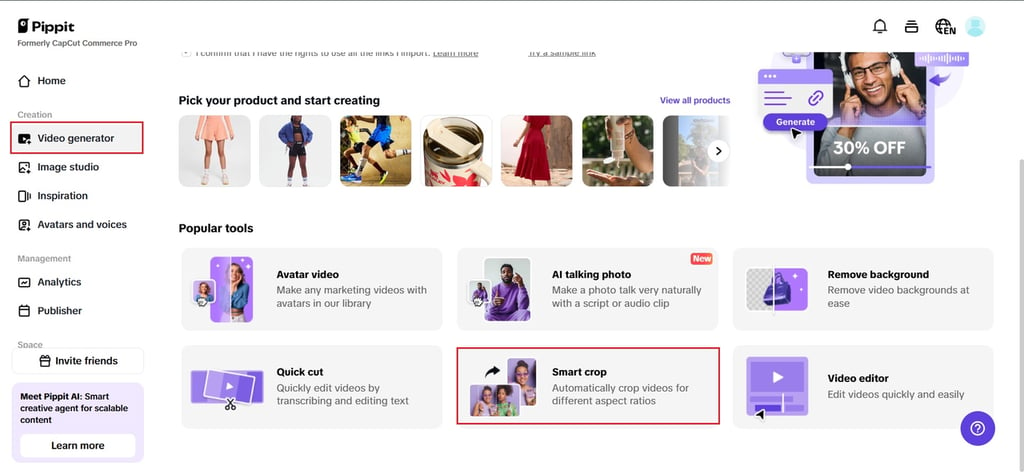
To get started, launch Pippit and choose the “Smart crop” tool from the main screen. A pop-up to upload your video straight from the computer or cloud storage will appear. Whether it’s a polished promo or raw iPhone footage, Pippit’s video resizer accepts it all.
This step is especially handy for creators who shoot horizontally by default—maybe on DSLR or desktop setups—but want to quickly adapt for platforms like TikTok or Instagram.
Step 2: Select the Aspect Ratio
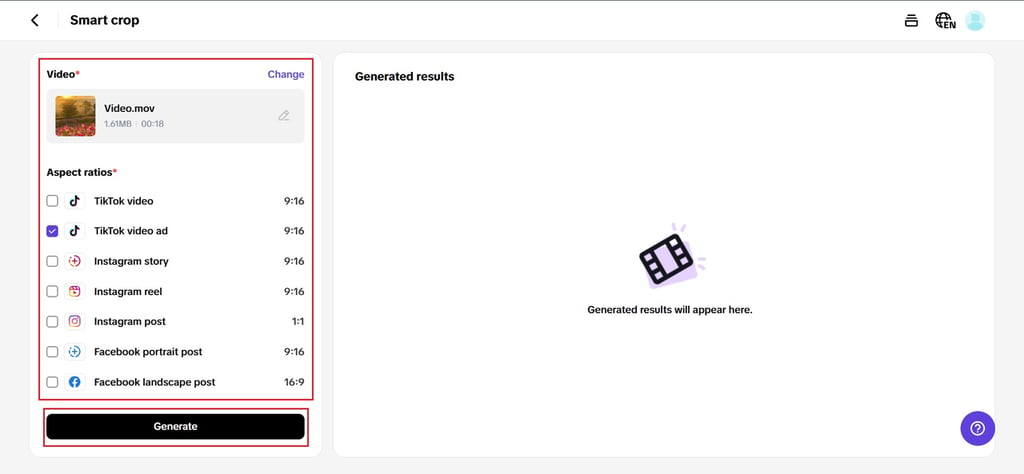
The strategic portion now begins. To choose which aspect ratio is most appropriate for your publishing platform, use Pippit’s built-in picker. Is YouTube Shorts going live? Pick 9:16. Planning a product demo for Facebook? Opt for 4:5 or 1:1. The tool offers real-time previews so you can drag to reframe and make sure key elements stay in view.
What’s especially useful is Pippit’s intelligent framing—the AI detects faces and motion zones to help keep the action centered. No annoying text gaps or cropping. Simply clear, simple framing that is customised for each feed.
Step 3: Export & Share Video
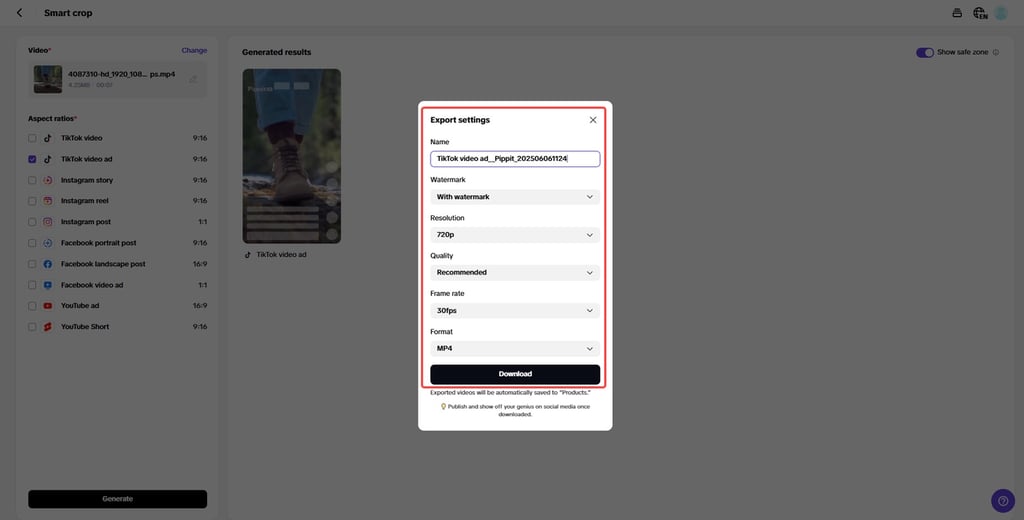
After your video has the ideal size, click preview to make one last check. To see how it will look in a scroll, you can switch between platform mockups. Then hit “Export” to download the clip in your preferred format and resolution.
Pippit lets you share watermark-free videos directly to platforms like Instagram, TikTok, or YouTube—or save them for scheduled campaigns. With its free tier, even solo creators can resize and distribute content across five platforms without spending a dime.
Beyond Format: Designing for the Scroll
Visual rhythm is key to keeping audiences engaged, but resizing content is what truly brings them in. In the fast-moving world of mobile viewing, even a short clip from a brewery tour, brew day, or beer launch event needs sharp pacing, clear on-screen text, and eye-catching motion to hold attention. If you’re crafting vertical content for beer fans or industry professionals, design intentionally for small screens: think bold visuals, concise messaging, and a layout that highlights your brand’s personality in just a few seconds.
- Employ vertically safe areas: Keep CTAs, faces, and captions away from the margins of the platform user interface.
- Fine print > big text: In mobile forms, when screen time is limited, bold, succinct content works best.
- The pace of jump cuts: Go quickly. Swipes are the result of visual boredom.
- Think about where to place your hands: Avoid placing important information in the lower third, where viewers’ thumbs rest.
The goal isn’t just to look native—it’s to feel like you were born on the platform.
Creators Who Resize, Rise Faster
Whether you’re a beauty influencer on Instagram, a food vlogger on YouTube Shorts, or a local shop running Pinterest ads, resized content signals that you get the platform. It tells the algorithm and your audience, “I belong here.”
Pippit simplifies this entire journey. From horizontal to vertical, from long-form to scroll-friendly, the platform lets your videos adapt without losing your brand voice. It’s a tool that empowers creative reuse, not just reposting.
Parting Scroll: Let Your Video Fit the Feed
Your video could be Oscar-worthy—but if it’s the wrong size for the feed, it won’t even get watched. In a world of short attention spans and high swipe speeds, resizing isn’t a hack—it’s the new baseline.
Adapting your brewery or beverage content for any platform is now easier than ever with Pippit’s free AI video creator. For beer brands, brewers, and beverage marketers aiming to engage today’s mobile-first audience, this tool offers a seamless way to stay visually relevant without straining your budget or time, while also opening up opportunities for a video editor making money through freelance content creation or brand collaborations.
So go ahead and shoot once, resize as many times as you like, and let each version go viral in its own right. Give your films the vertical boost they need by giving Pippit a try right now.
Image Credit: DALL-E


Comments 0
No Readers' Pick yet.